PaddleScience Introduction
PaddleScience comprises 12 modules structured by code functionality. From a general deep learning workflow perspective, these modules handle input data construction, neural network model architecture, loss function definition, optimizer configuration, training, evaluation, and visualization. In the context of scientific computing, certain modules serve distinct functions compared to traditional CV and NLP tasks. For instance, the Equation module, designed for physics-driven tasks, defines governing equations and facilitates higher-order differential calculations; the Geometry module handles geometric scene sampling, defining both simple and complex shapes to sample interior and boundary data; and the Constraint module unifies different optimization objectives as "constraints." This design allows the suite to standardize three distinct solving paradigms—physics-driven, data-driven, and physics-data fusion—within a single training framework.
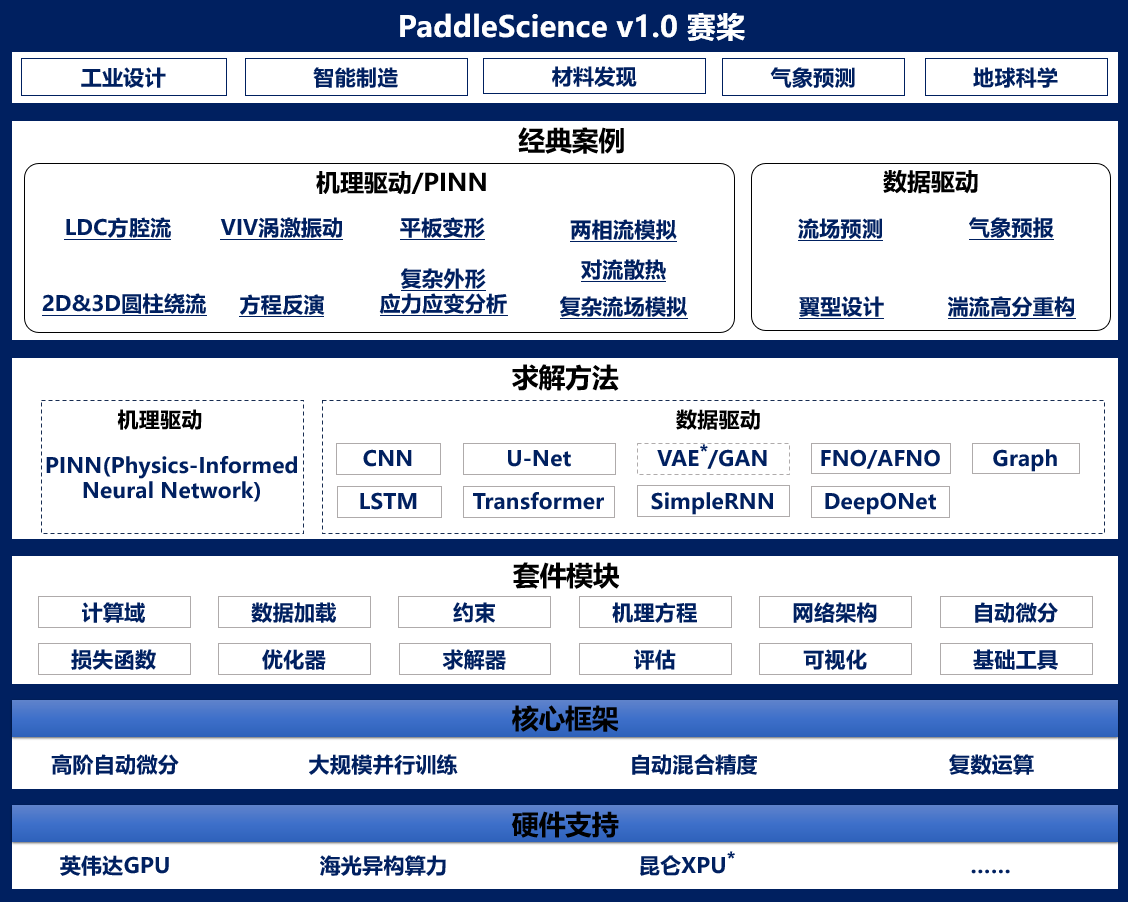
1. Overall Workflow
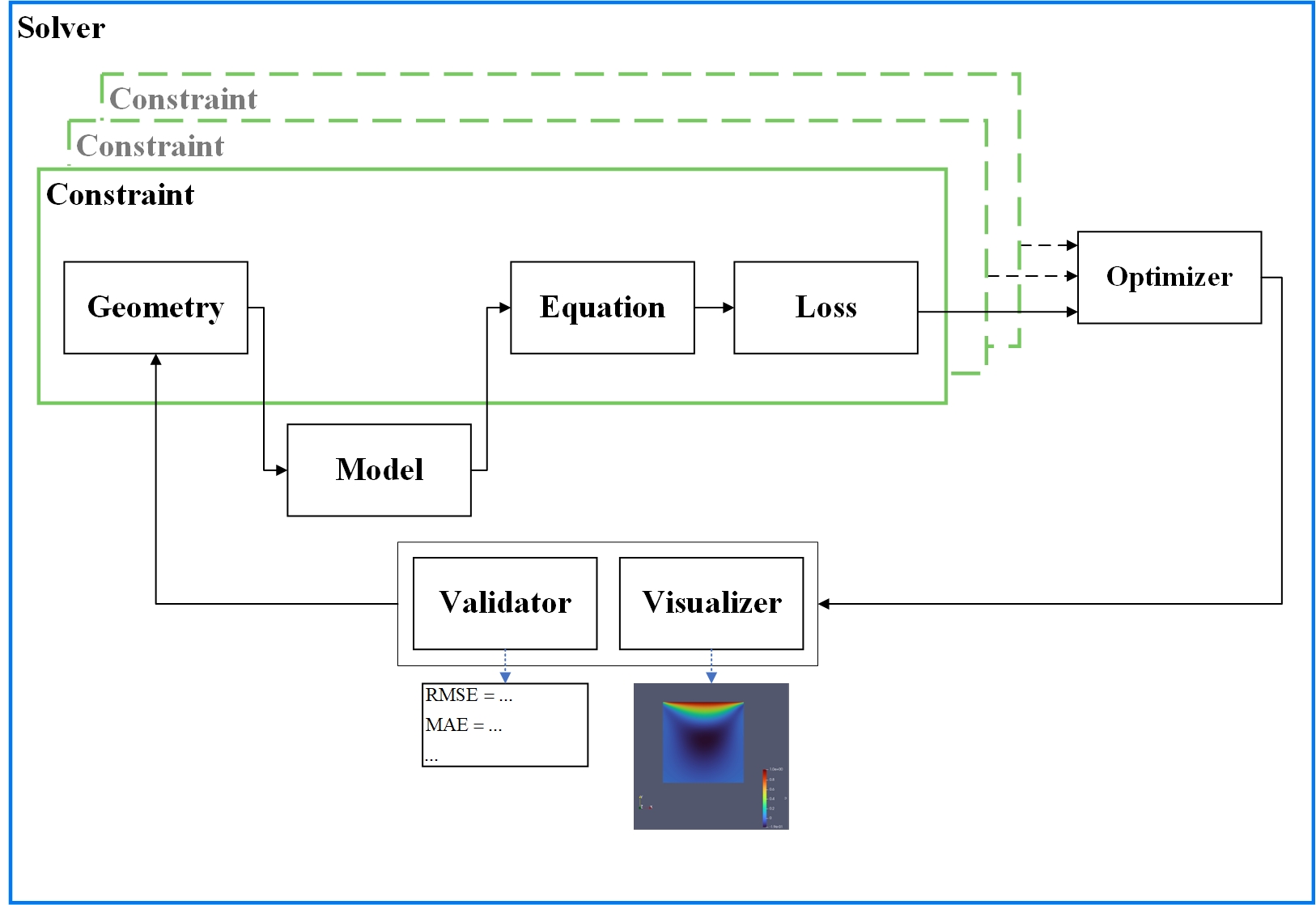
The figure above illustrates the PaddleScience workflow (using a geometry-based problem as an example). The process is described as follows:
- Geometry constructs the geometric domain and performs sampling to generate input data.
- The Model module accepts inputs and computes model outputs.
- Scientific computing tasks often require further processing. Model outputs are typically not the final result; additional calculations of variables required by the governing equations are performed via the Equation module.
- The loss function is computed, and the framework's automatic differentiation mechanism calculates gradients for all parameters.
- Optimization objectives can apply to different geometric regions (e.g., interior and boundary areas), resulting in multiple Constraints as shown in the figure.
- Gradients from all Constraints are accumulated to update model parameters.
- If evaluation and visualization are enabled, the model is automatically evaluated, and prediction results are visualized at specified intervals.
- Solver acts as the global scheduler, managing the entire suite's operation and repeating the process according to user-defined epochs and frequencies.
2. Module Introduction
2.1 Arch
The Arch module handles network model assembly, parameter initialization, and forward calculation. It includes multiple built-in models for immediate use.
2.2 AutoDiff
The AutoDiff module calculates higher-order differentials. It provides built-in global singletons, jacobian and hessian, based on PaddlePaddle's automatic differentiation mechanism.
2.3 Constraint
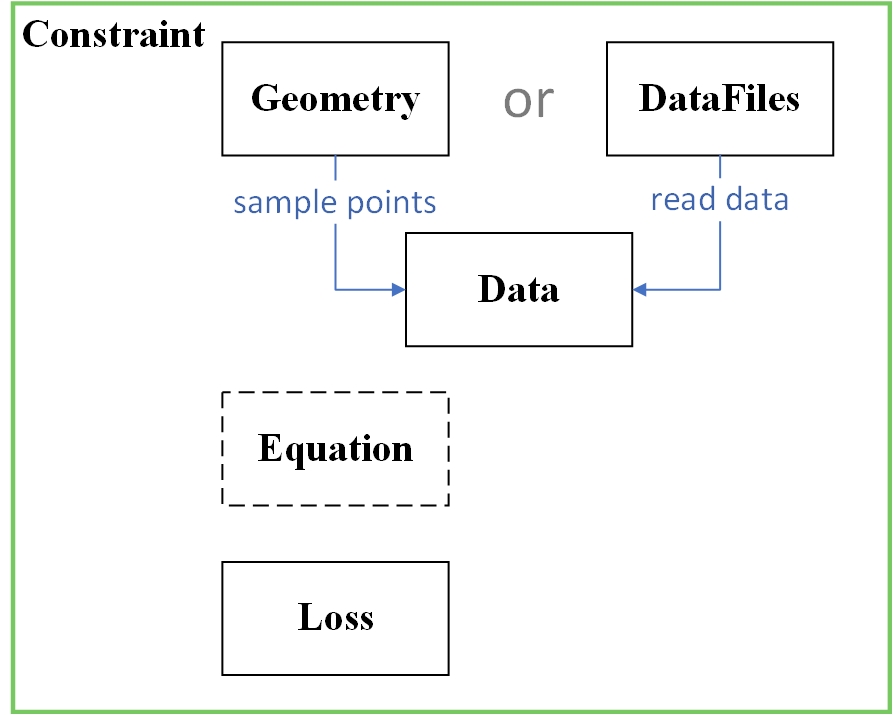
To unify the three solving paradigms—physics-driven, data-driven, and physics-data fusion—the Constraint module encapsulates necessary interfaces for data construction, the input-to-output calculation process, and loss functions. Using these interfaces, Constraint can represent various training objectives, such as:
InteriorConstraint: Applies loss functions within a specified geometric interior to optimize model parameters, ensuring outputs satisfy given conditions.BoundaryConstraint: Applies loss functions on geometric boundaries to optimize model parameters, ensuring outputs satisfy boundary conditions.SupervisedConstraint: Applies loss functions to labeled data (analogous to supervised training in CV and NLP) to optimize model parameters.- ...
This module serves two main functions: 1. Unification: It standardizes the code flow for both physics-driven (often unsupervised) and data-driven (supervised) optimization paradigms. 2. Fusion: It facilitates physics-data fusion by allowing users to construct distinct Constraints and train them jointly.
2.4 Data
The Data module handles data reading, encapsulation, and preprocessing, as detailed below.
| Submodule Name | Submodule Function |
|---|---|
| ppsci.data.dataset | Dataset related |
| ppsci.data.transform | Single data sample preprocessing related methods |
| ppsci.data.batch_transform | Batch data preprocessing related methods |
2.5 Equation
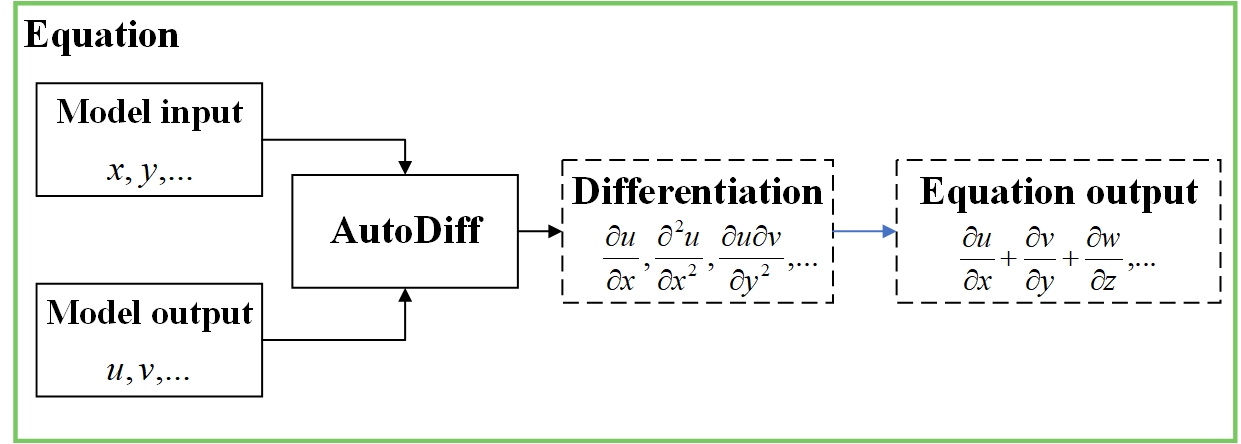
The Equation module defines calculation functions for common governing equations, such as NavierStokes for N-S equations and Vibration for vibration equations. Each equation class encapsulates the logic for computing related variables.
2.6 Geometry
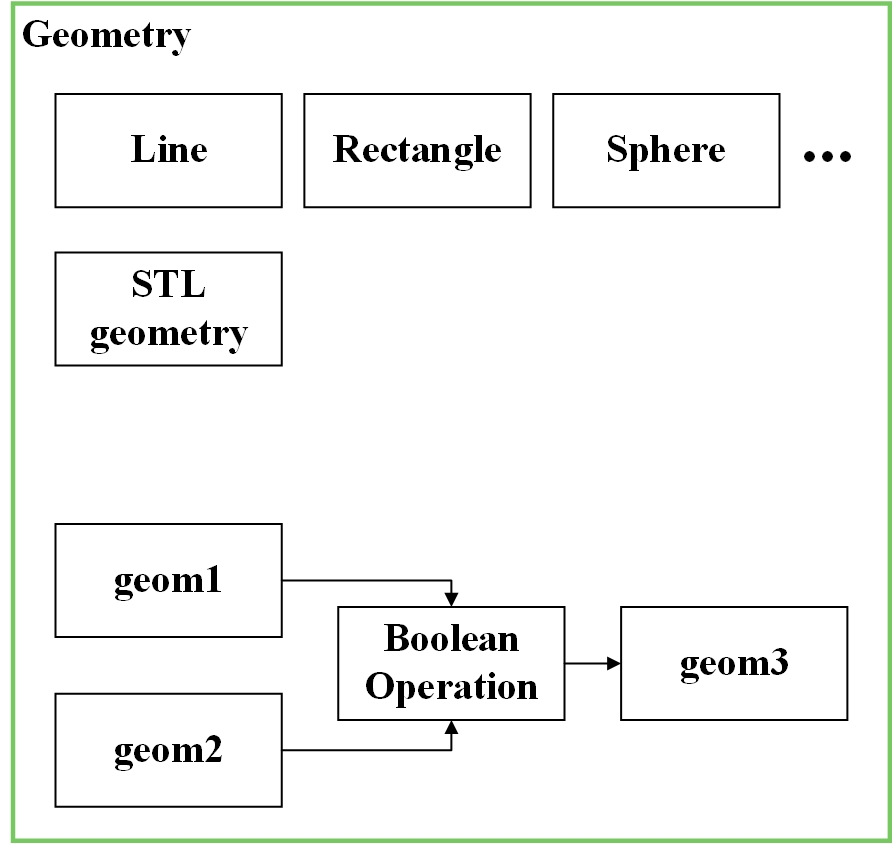
The Geometry module defines common geometric shapes, including Interval (line segment), Rectangle, and Sphere.
2.7 Loss
The Loss module includes two submodules: ppsci.loss.loss and ppsci.loss.mtl, as shown below.
| Submodule Name | Submodule Function |
|---|---|
| ppsci.loss.loss | Loss function related |
| ppsci.loss.mtl | Multi-objective optimization related |
2.8 Optimizer
The Optimizer module includes two submodules: ppsci.optimizer.optimizer and ppsci.optimizer.lr_scheduler, as shown below.
| Submodule Name | Submodule Function |
|---|---|
| ppsci.utils.optimizer | Optimizer related |
| ppsci.utils.lr_scheduler | Learning rate scheduler related |
2.9 Solver
The Solver module defines the solver, acting as the startup and management engine for training, evaluation, inference, and visualization.
2.10 Utils
The Utils module contains utility classes and functions applicable to various scenarios, such as data reading in reader.py, logging in logger.py, and equation calculations in expression.py.
It is subdivided into the following 8 submodules based on functionality:
| Submodule Name | Submodule Function |
|---|---|
| ppsci.utils.checker | ppsci installation function check related |
| ppsci.utils.expression | Responsible for forward calculation of models and equations involved in training, evaluation, and visualization |
| ppsci.utils.initializer | Common parameter initialization methods |
| ppsci.utils.logger | Log printing module |
| ppsci.utils.misc | Store general functions |
| ppsci.utils.reader | File reading module |
| ppsci.utils.writer | File writing module |
| ppsci.utils.save_load | Model parameter saving and loading |
| ppsci.utils.symbolic | sympy symbolic calculation function related |
2.11 Validate
The Validator module defines various validators for evaluating the model on specified data (optional; evaluation is not enabled by default during training) and computing evaluation metrics.
2.12 Visualize
The Visualizer module defines visualizers for generating predictions on specified data after model evaluation (optional; visualization is not enabled by default during training) and saving the results as visualization files.